
Key takeaways:
When a business gets a new contract or takes on a job for another company, one of the first things they’ll be asked for is a Certificate of Insurance. It’s a routine request, but there’s more to it than just sending over a document – knowing how to get one quickly, what it can include, and how to spot a fake can save everyone a real headache.
Bridget Koch, MEM Customer Care Manager, walks through how certificates of insurance work, what agents and businesses need to know, and what to do if something doesn’t look right.
What is a Certificate of Insurance?
A Certificate of Insurance (COI) is a document that provides proof of coverage. Common situations when a business might need one include:
- Starting a job or project for a general contractor or property owner
- Bidding on work that requires proof of coverage upfront
- Hiring or working alongside subcontractors who need to verify each other’s coverage
- Onboarding with a new customer or vendor that requires it as a condition of doing business
How to get a COI through MEM
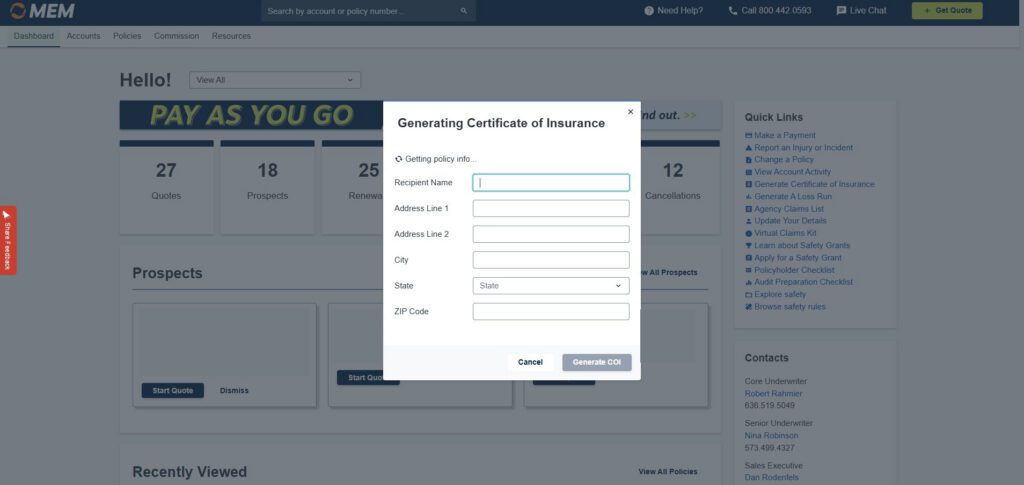
Businesses can generate and download a COI directly through the MEM customer portal – no need to call or wait. Agents can generate them for clients in the agent portal. The only thing you need to get started is the certificate holder’s information: the name and address of the business or person for whom work is being done.
“It’s really easy to generate a Certificate of Insurance through our customer or agent portal as long as you have the certificate holder’s information,” Koch said.
Once generated, COIs are stored in the documents section of the portal, so they’re easy to find and re-download later. Agents can help businesses through the process by pointing them to the right place in the portal and making sure they have the certificate holder’s details ready to go.
For detailed steps to generate a COI in the portal, download or bookmark our instruction guides:
⏬ How to generate a Certificate of Insurance (agents)
⏬ How to generate a Certificate of Insurance (policyholders)
What a COI can – and can’t – include
MEM handles the workers compensation line – that’s what will appear on the certificate. One thing that Koch has seen come up: Requests to change what’s listed in the certificate holder or insured sections. This might seem like a small edit, but it’s actually asking MEM to represent that someone other than the named insured is covered under the policy – which isn’t accurate and can’t be done.
“We can’t add anything but the certificate holder’s information to those lines because we can’t alter coverage in a certificate,” Koch said.
If a business needs to show general liability or auto coverage alongside their work comp, they’ll need to work with those carriers separately. Similarly, if they have a work comp policy in a state outside MEM’s footprint, that coverage will be on a separate certificate provided by that policy’s carrier.
How to spot a fraudulent COI
COI fraud is a real risk – especially when working with subcontractors or vendors for the first time. And with AI tools now capable of generating convincing fake documents, it’s more important than ever to verify before you trust.
“Policyholders and agents should be on the lookout for a fraudulent COI all the time,” remarked Koch. “I wouldn’t say that you could ever be too cautious.”
Here are some common red flags to look for:
- The document is blurry or low resolution
- Any information appears whited out or altered
- Details look handwritten rather than typed
- The overall formatting looks off compared to a standard certificate
To verify whether the insurance carrier listed on a COI is legitimate, check AM Best – it’s a quick way to confirm the company is a real, rated carrier. One more step worth taking when there’s any doubt: Ask the other party to add a 30-day notice of cancellation endorsement to their policy, so you’re notified if coverage lapses before it’s too late.
📍 Read next: Protect Your Business: Spotting and Stopping Fake Certificates of Insurance >
The agent’s role in the COI process
Helping businesses navigate COI requests is one of the practical ways agents add real value day to day – whether that’s explaining the portal, clarifying what’s covered, or flagging a certificate that doesn’t look right. The more familiar you are with how COIs work, the easier it is to keep things moving for the businesses you serve.
Need to generate a COI right now? Log in to the portal to get started: Policyholder Portal | Agent Portal
Frequently asked questions: Certificates of insurance
The Certificate of Insurance, or COI, is evidence that your workers compensation is valid and currently protecting your employees. It shows the name of the certificate holder, the policyholder, insurance company, policy number, type of insurance coverage and policy effective dates. The COI will also indicate whether the owner is covered by the policy.
Always ask for copies of any subcontractor’s COI. Often, the easiest way to get these is by contacting the subcontractor’s agent. To verify, ask the agent or contact the carrier on the certificate to confirm that coverage will be effective when the services are used and paid for. This is important because you could be liable for claims involving a subcontractor’s injury.
If something looks off (the document is blurry, information appears whited out, or details look handwritten) you can verify the carrier by looking them up on AM Best to confirm they’re a legitimate insurance company. You can also request that the other party add a 30-day notice of cancellation endorsement to their policy, which means you’ll be notified if their coverage lapses. To report a suspected fraudulent COI, contact our Special Investigative Unit online or by calling 800.442.0593.
No. MEM only issues certificates for workers compensation coverage. If you need to show proof of general liability or auto coverage, you’ll need to request a separate certificate from those carriers.
No. A Certificate of Insurance can only reflect the policy’s actual coverage. Listing someone other than the named insured in the insured section would misrepresent who is covered — which MEM cannot do.
MEM can only issue a certificate for coverage on your MEM policy. If you have a separate policy for out-of-state coverage, you’ll need to request a certificate from that carrier directly.
Once generated, your COI is stored in the documents section of the MEM policyholder portal, so you can find and re-download it anytime.